
Connect ERPNext and your sales channels without disconnected data
Connect orders, items, inventory, payments and fulfillment across Shopee, Lazada, TikTok Shop, Shopify, WooCommerce, POS and internal systems. Reduce duplicate work and trace errors end to end.
Systems businesses often need to connect
Examples for integration planning; feasibility depends on API access, permissions and project scope.
Disconnected data creates work your team should not have to do
Orders across marketplaces must be checked one shop at a time
Mismatched product SKUs cause mapping failures and stock discrepancies
Sales and payment records do not match ERP documents
Status updates lag, duplicate orders appear or records go missing
When an integration fails, no one knows where to investigate

Storefront stock should reflect what your business can actually sell
A confirmed order should connect to the right SKU and warehouse, with reservations and failed updates visible. We design mapping and reconciliation to reduce overselling risks.
Integrations designed around how your business actually runs
We begin with data ownership, access permissions and exception handling—not just whether two APIs can exchange data.

Marketplace & Order Integration
Import and update orders from supported marketplaces while mapping order status to ERPNext sales documents.
Shopify & WooCommerce Sync
Synchronize ecommerce orders, customers, products and shipping events with an explicit source of truth.
Inventory & Warehouse Sync
Publish governed available-to-sell stock from designated warehouses, accounting for reservations and SKU mapping.
Payments, Invoices & Finance
Pass payment references into ERPNext for accounting-policy-based document creation and reconciliation.
Fulfillment & Shipping
Integrate packing, fulfillment and tracking where platform APIs support it, without unnecessary workflow coupling.
API, Webhook & Legacy Systems
Integrate internal or legacy systems using validated APIs, webhooks or controlled file exchange.
Data Mapping & Reconciliation
Define SKU, customer, warehouse and transaction mappings, then surface discrepancies for review.
Monitoring, Retry & Audit Logs
Expose successful, pending, retried and failed transfers with diagnostics and duplicate-safe recovery.
Trace every payment back to its order
Payment confirmation should not create duplicate accounting entries. Distinct transaction IDs, payment states and accounting documents support partial payments and refunds.
One reliable data flow across the business
An illustrative architecture has marketplaces, websites and POS sending events through a gateway with mapping and duplicate checks into ERPNext, then onward to inventory, finance and shipping where APIs permit.
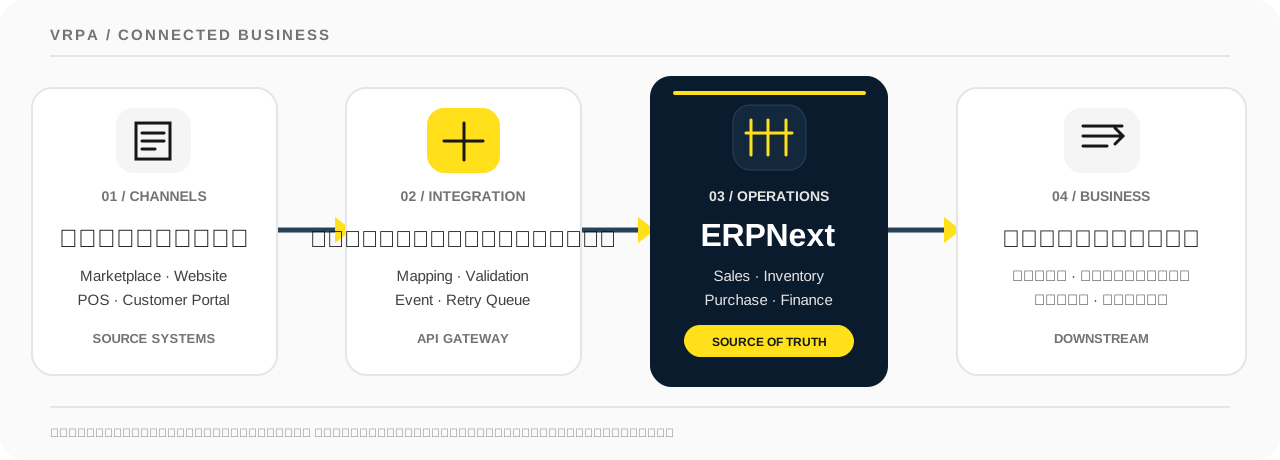
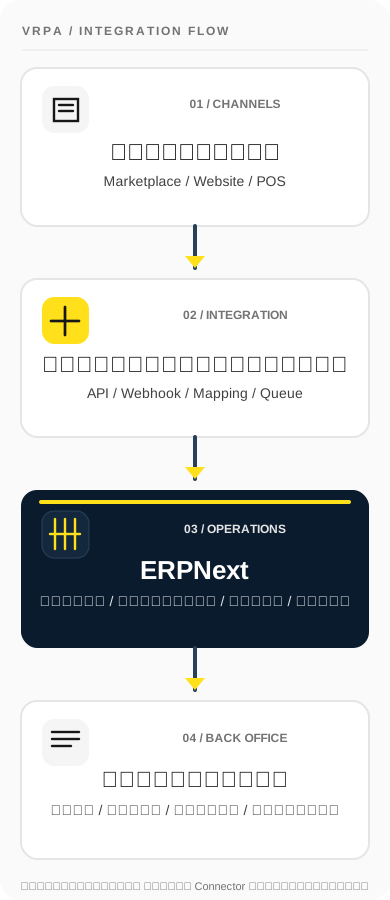
How integrations support real business processes
These are illustrative integration designs, not claims of ready-made connectors. Exact scope depends on platform APIs and business policies.
Consolidate orders across channels without duplicate entry
For businesses selling through multiple marketplaces and ecommerce platforms that need reliable ERPNext order intake, including exception handling for unmapped products.
- 01
Receive new orders via supported APIs or webhooks
- 02
Map SKUs, customers and warehouses; surface unmapped items
- 03
Evaluate payment and order status before creating ERP documents
- 04
Track source IDs, prevent duplicates and return statuses where supported
One order queue for the sales team, with clear exceptions instead of silent failures.
Publish stock based on real warehouse rules, not a raw number
Items may exist across warehouses, have reservations or allow preorders. Sellable quantity must follow the business's allocation rules and each channel's capabilities.
- 01
Define ERPNext or WMS as the inventory source of truth
- 02
Map variants to allowed items and warehouses
- 03
Calculate sellable stock using reservations and sales policies
- 04
Log updates, reconcile mismatches and guard against unintended zero-stock publication
Reduce overselling risk and identify inventory exceptions before they spread.
Connect payments, sales documents and fulfillment with traceability
Online payment information can arrive before invoicing, and orders may be partially paid, refunded or cancelled. Accounting and fulfillment rules must reflect those states.
- 01
Record transaction IDs and payment status separately from document status
- 02
Create or update ERPNext sales and payment documents under approved rules
- 03
Handle partial payments, refunds and cancellations without duplicate entries
- 04
Return tracking and fulfillment status where platform APIs support it
Finance gets auditable payment references while shipping status remains independent.
A practical process from discovery to monitored go-live
Each platform has different API constraints. We define data ownership, integration scope and UAT criteria before go-live so your teams can operate the system afterward.

- 01
Review existing systems
Identify sales channels, inventory, finance, documents and API limitations.
- 02
Design data mapping & rules
Define SKU, status, warehouse, permissions and field-level data ownership.
- 03
Build integrations & workflows
Implement only required events with queues, retries and traceable logs.
- 04
Test exceptions & user acceptance
Test duplicate orders, partial payments, unavailable stock, cancellations and failed API calls.
- 05
Launch & monitor
Roll out by channel, monitor sync outcomes and hand over incident procedures.
Design with the people who will operate it
Sales, warehouse and finance teams should agree on the same workflow. We map data and test exceptions with actual users before automating it.
What your team receives when the integration is handed over
A usable integration needs a documented data contract, testing criteria and recovery procedures—not just connector code.
Integration Blueprint
Documented sources, destinations, events, owners and actual data exchange scope.
Field Mapping & API Contract
Field and state mappings plus payload, authentication, API limit, retry and idempotency rules.
Monitoring & Exception Queue
Traceable sync results, error reasons and exception handling for API or data failures.
UAT & Handover
Acceptance tests for duplicates, partial payments, cancellation, refunds, stock mismatches and handover guidance.
Secure integrations with controls that prevent duplicate data
Integration design must govern access, source data and document creation—especially for orders, payments and inventory.
Least-Privilege Access
Use scoped permissions and separate credentials without exposing unrelated APIs or databases.
Duplicate-Safe Transactions
Use unique source references so retries cannot create duplicate orders or payments.
Reconciliation & Audit
Record source references, destinations, timestamps and outcomes for reconciliation.
Recovery Without Data Loss
Controlled retries, alerts for pending work and targeted human recovery.
Permissions, backups and security controls must be designed and verified against the actual production environment.
Start even without every API document
Share your systems, sales channels, data mismatches and update expectations. VRPA can help prioritize the most valuable integrations and identify missing API access.
Discuss your requirements- Current sales channels and back-office systems
- Sample items, SKUs, warehouses and orders
- Stock, payment, cancellation and fulfillment policies
- Data owners and integration access permissions
Common questions before an integration project
Can every field be synced from Shopee, Lazada, TikTok Shop, Shopify and WooCommerce?
Not every platform exposes every field. Coverage depends on merchant permissions, API version, rate limits and available endpoints. We map feasible fields before confirming scope.
Which system should be the source of truth for inventory?
Usually ERPNext or a designated WMS owns sellable stock based on mapped warehouses and reservations. Storefront updates should follow an explicit policy to avoid duplicate or circular updates.
What happens if a webhook retries or an order arrives twice?
Use unique source identifiers, idempotent writes, a controlled retry queue and reconciliation so slow APIs do not create duplicate orders or payments.
Will Sales Orders, Sales Invoices and Payment Entries be created automatically?
This is configurable. For example, a paid order may trigger a Sales Order and a payment record tied to a transaction ID. Payment status and accounting status remain separate, with refund and cancellation rules defined in scope.
Do integrations require AI or MCP?
No. Core order, inventory and accounting integrations work through APIs and webhooks. AI/MCP is optional and requires a separate access policy.
Tell us what you use. We will map a workable integration.
You do not have to connect every platform at once. Share your sales, stock and finance tools and we will prioritize the integrations that matter.